(855) 676-0881

Troubleshooting Commercial Automatic Doors That Close on Pedestrians


Published: Oct 6, 2026

As a facility manager, few entry-point malfunctions are as hazardous as an entrance that opens smoothly, only to close directly onto a pedestrian. When a commercial pedestrian entrance behaves this way, the safety of your guests is compromised and your liability risk skyrockets.

Please note: This guide is dedicated exclusively to commercial pedestrian doors (sliding, swinging, and folding) found in retail, healthcare, and office environments. For residential garage door troubleshooting, please refer to specialized residential guides.

If you are currently experiencing sensor failures, securing professional automatic door troubleshooting is the fastest way to restore safety and code compliance. Below, we break down why this dangerous failure occurs, how to diagnose it, and when it is time to upgrade your hardware.


The Anatomy of a Strike: The Activation vs. Presence Paradox


To understand why a door closes on slow-moving or stationary people, you must understand the two distinct sensor technologies at play:

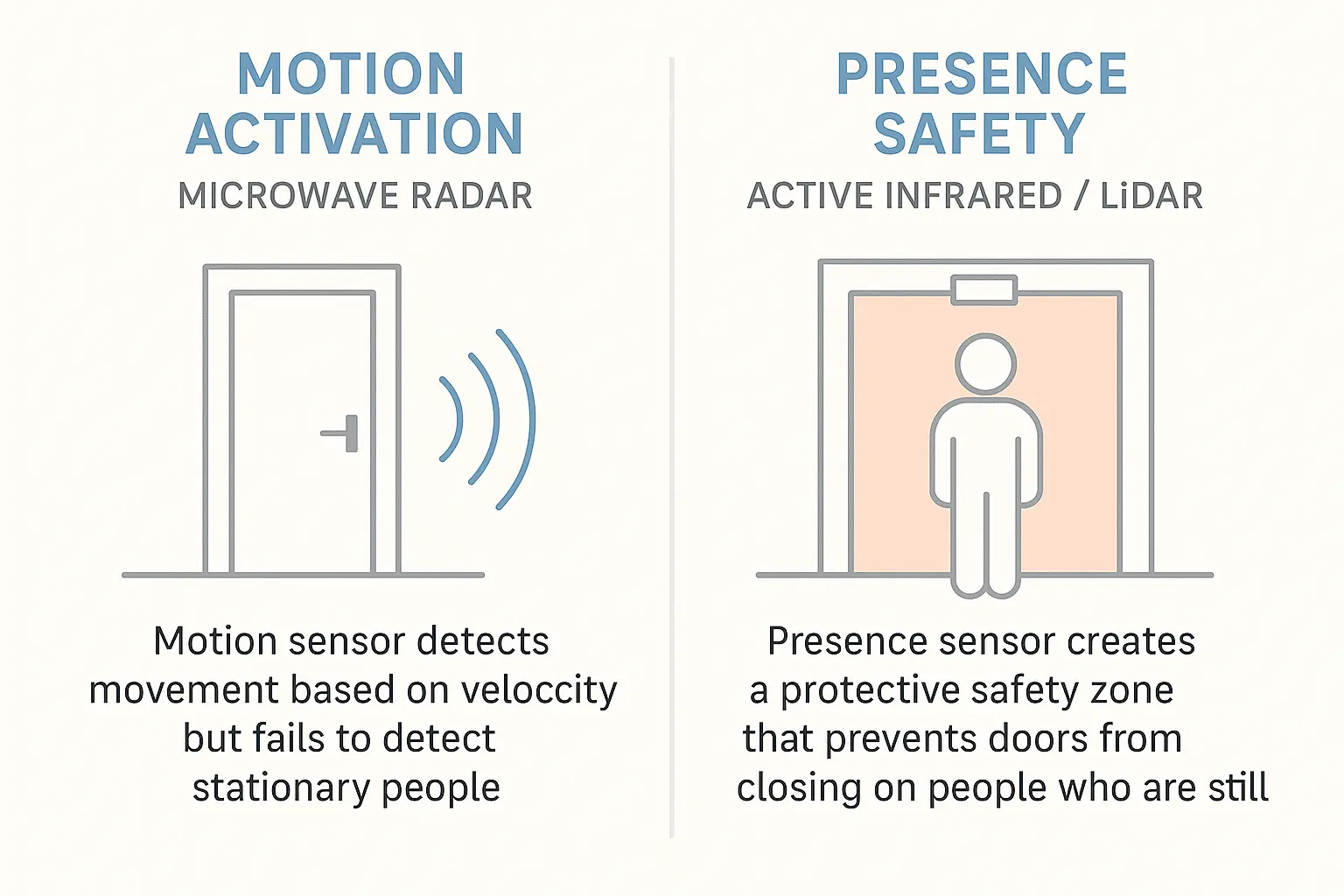
  1. Microwave Radar (Activation): Operating on the Doppler effect, these sensors only detect velocity. They are designed to open the door when they register a person walking toward the entrance at a normal pace.
  2. Active Infrared (Presence): These sensors project a dense “curtain” of light down into the door threshold. Because they measure the reflection of light, they detect stationary or slow-moving objects.

When a door opens but subsequently closes on someone, the microwave sensor has successfully initiated the opening cycle, but the active infrared (AIR) sensor has failed to register the person standing in the threshold, allowing the “timer-to-close” to override safety systems.

According to forensic engineering data, automatic door strikes represent one of the most common premises liability risks for commercial facilities. Over 80% of automatic door injury lawsuits involve a door closing on an elderly, disabled, or distracted patron standing in the threshold. Under ANSI/BHMA A156.10 standards, automatic sliding doors must have a presence detection field that covers the threshold and extends at least 5 inches from the face of the door on both sides. For swing doors regulated under ANSI/BHMA A156.19, door-mounted presence sensors must protect the entire physical sweep path of the door.

This diagram clarifies why automatic commercial doors may close on stationary people—the motion sensor detects movement but fails to sense presence, whereas infrared presence sensors create a safety zone preventing door closure on pedestrians.


The 5-Step Diagnostic Protocol


Before calling out a technician, facility managers can perform this systematic diagnostic protocol to identify if your automatic door sensor not working is due to a simple environmental factor or a hardware failure.

The Lens Inspection (Cleaning Protocol)

Over time, dust, road salt, rain spots, and exhaust film coat the polycarbonate lens of header-mount sensors. This buildup scatters the infrared beams, leading to a false “clear” state or triggering a constant safety lockout. Wipe the sensor lens gently with a clean, damp microfiber cloth. Avoid harsh chemical cleaners that can cloud the plastic.

The LED Status Code Decoder

Observe the LED indicator on your sensor header (such as a BEA Bodyguard, SDC AUTO-IR, or Optex OA-Presence):

  • Solid Green: Standby mode (no detection).
  • Solid Red: Active presence detection (the door should remain open).
  • Flashing Red/Orange: Internal error or signal crosstalk.

Mechanical Tilt Adjustment

If your LED remains green when someone stands in the door path, the infrared curtain may be tilted too far outward, creating a “dead zone” directly in the door track. Using the manual adjustment screws on the sensor chassis, adjust the angle of the physical module to shift the pattern closer to the threshold.

Vestibule Crosstalk Elimination

If you have adjacent automatic doors, their active infrared frequencies may interfere with one another. To resolve this “crosstalk,” locate the internal dip switches on the sensor board and change the frequency channel on one of the units according to the manufacturer’s schematic.

Wiring & Relay Failsafe Check

Ensure the sensor’s wiring harness is seated firmly in the door controller. If the wiring is loose or the contacts are corroded, the “Normally Closed” (NC) or “Normally Open” (NO) safety loop may fail, preventing the controller from receiving the safety override signal.
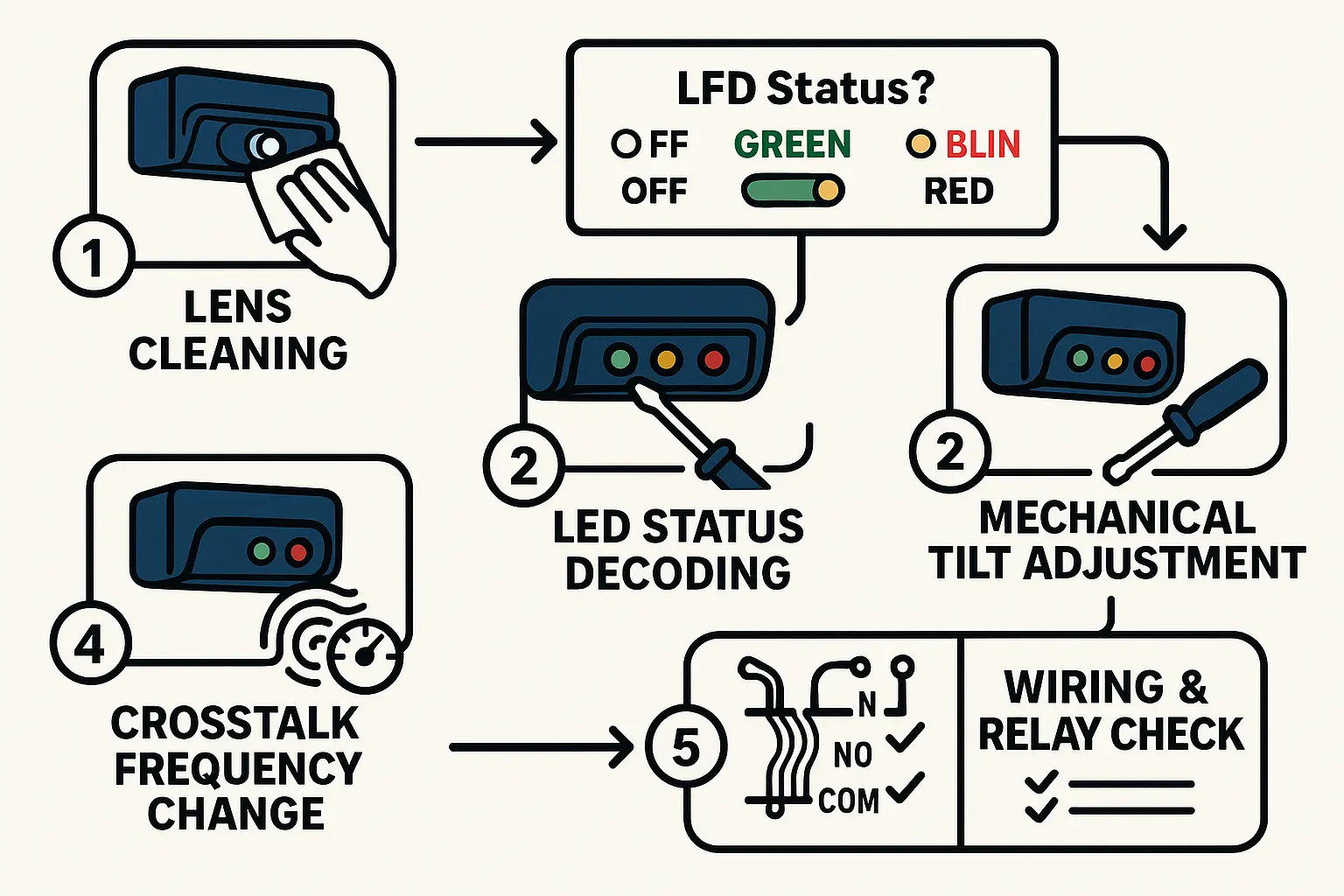
This flowchart guides facility managers through a straightforward 5-step diagnostic process to fix or troubleshoot automatic door presence sensors, boosting confidence and safety compliance.


When to Retrofit: Comparing Commercial Presence Sensors


If basic troubleshooting fails to resolve the issue, your sensor is likely obsolete or electrically dead. Upgrading to modern automatic door sensors is a highly cost-effective way to protect your business from liability.

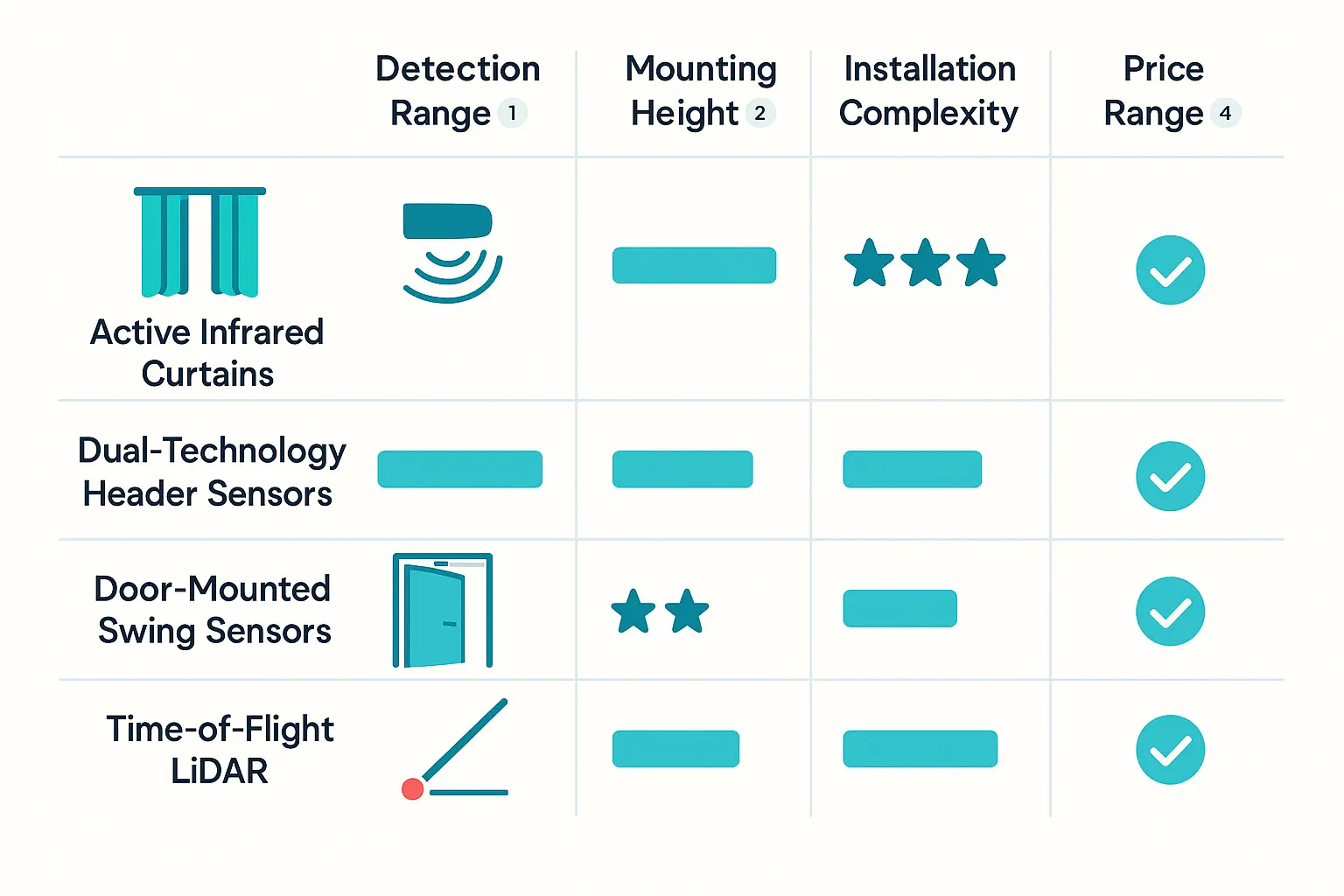
When choosing a replacement automatic door sensor, consider the primary technologies used by industry leaders like BEA, Optex, and SDC:

  • Active Infrared (AIR) Curtains (e.g., SDC AUTO-IR, BEA Bodyguard-T): Focuses exclusively on presence detection. Best used in conjunction with a separate motion sensor.
  • Dual-Technology Header Sensors (e.g., BEA IXIO-DT1, Optex OA-Axis): Combines microwave motion and active infrared presence into a single, sleek unit. This is the modern industry standard for sliding doors.
  • Door-Mounted Swing Sensors (e.g., BEA SuperScan II): Mounts directly to the moving door panel to protect the entire sweep path.
  • Time-of-Flight Laser (LiDAR) (e.g., BEA LZR-MicroScan): Highly precise, custom-programmable safety fields that eliminate traditional blind spots. Ideal for high-security or high-traffic environments.

This comparison chart serves as a memorable visual anchor for facility managers evaluating commercial presence sensor options to retrofit automatic doors safely and compliantly.

If your physical door panel or operator is worn out alongside the sensors, it may be time to seek a comprehensive automatic door replacement to bring your entire entryway up to modern specifications.


Frequently Asked Questions


Why does my automatic door close on people when it is raining or snowing?

Water droplets or snowflakes falling through the sensor path can refract the active infrared beams, causing the sensor to misinterpret the reflections. While modern sensors have built-in rain-mode filters, severe weather can still cause erratic performance. Installing a small weather hood over header-mounted sensors can prevent moisture from pooling on the lens.

What is the difference between an ANSI A156.10 door and an ANSI A156.19 door?

ANSI A156.10 governs high-speed, fully automatic sliding and swinging doors commonly found in supermarkets and airports. ANSI A156.19 applies to low-energy power-operated doors, typically activated by push-plates, which are highly critical when designing an automatic door for senior living facility or healthcare spaces where users move slowly.

Can I replace an automatic door presence sensor myself?

While simple physical cleaning and visual inspections can be handled by on-site maintenance staff, wiring, calibrating, and certifying sensors to ANSI standards requires specialized equipment and training. To ensure your entryways are fully compliant, contact a certified professional for expert automatic sliding door repair and calibration.