(855) 676-0881

The Ultimate Guide to Automatic Door Sensors, Safety Standards, and Troubleshooting


Published: Sep 4, 2026

For commercial facility managers and property owners, an automatic entrance is a major investment in accessibility and energy efficiency. However, when an automatic door fails to open, shuts prematurely, or cycles endlessly, it presents immediate safety hazards, security vulnerabilities, and spikes in utility costs.

Understanding the underlying technology—how operators, sensors, and control boards communicate—is key to keeping your entryways safe, compliant, and cost-effective.
Architectural Blueprint: How Automatic Door Sensors Work


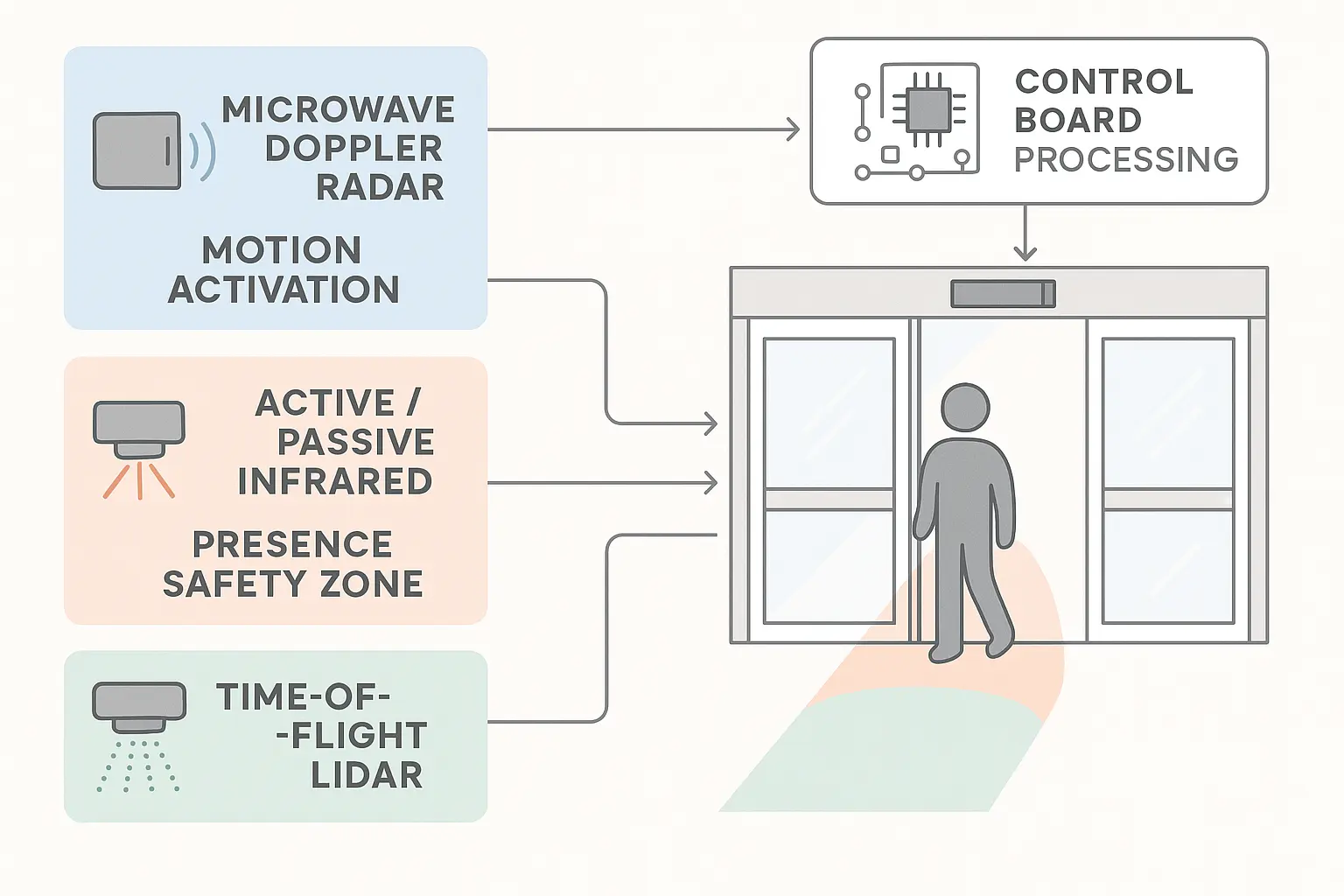
Modern automated entry systems rely on a continuous, real-time communication loop between sensors and the central control unit. Sensors operate using distinct physical principles, broadly categorized into activation (motion) detection and safety (presence) detection.

  1. Microwave Doppler Radar: Best suited for high-speed activation. These sensors emit high-frequency radio waves and measure the frequency shift of the returned signals to detect movement. Because they only register motion, they are highly effective for opening doors but cannot detect a stationary pedestrian standing in the threshold.
  2. Active and Passive Infrared (PIR): Primarily used for presence detection. Active infrared sensors emit light beams and detect changes in the reflected light pattern when an object enters their field. If the pattern changes, the sensor holds the door open.
  3. Time-of-Flight (TOF) LiDAR: The gold standard for precision safety. TOF sensors emit rapid light pulses and measure the time it takes for them to return, creating a highly accurate 3D map of the opening. Advanced TOF LiDAR sensors can calibrate a threshold safety blind spot down to less than 10 cm (4 inches) from the floor [1]. This ensures wheelchair footrests, small children, and pets are detected without the sensor being falsely tripped by floor mats, grout lines, or thermal drafts.

Architectural Blueprint Section explaining sensor technologies and control board mechanics

This diagram clarifies the core sensor technologies and how their activation and safety signals are processed by the automatic door control board, bridging abstract technology and real-world operation.


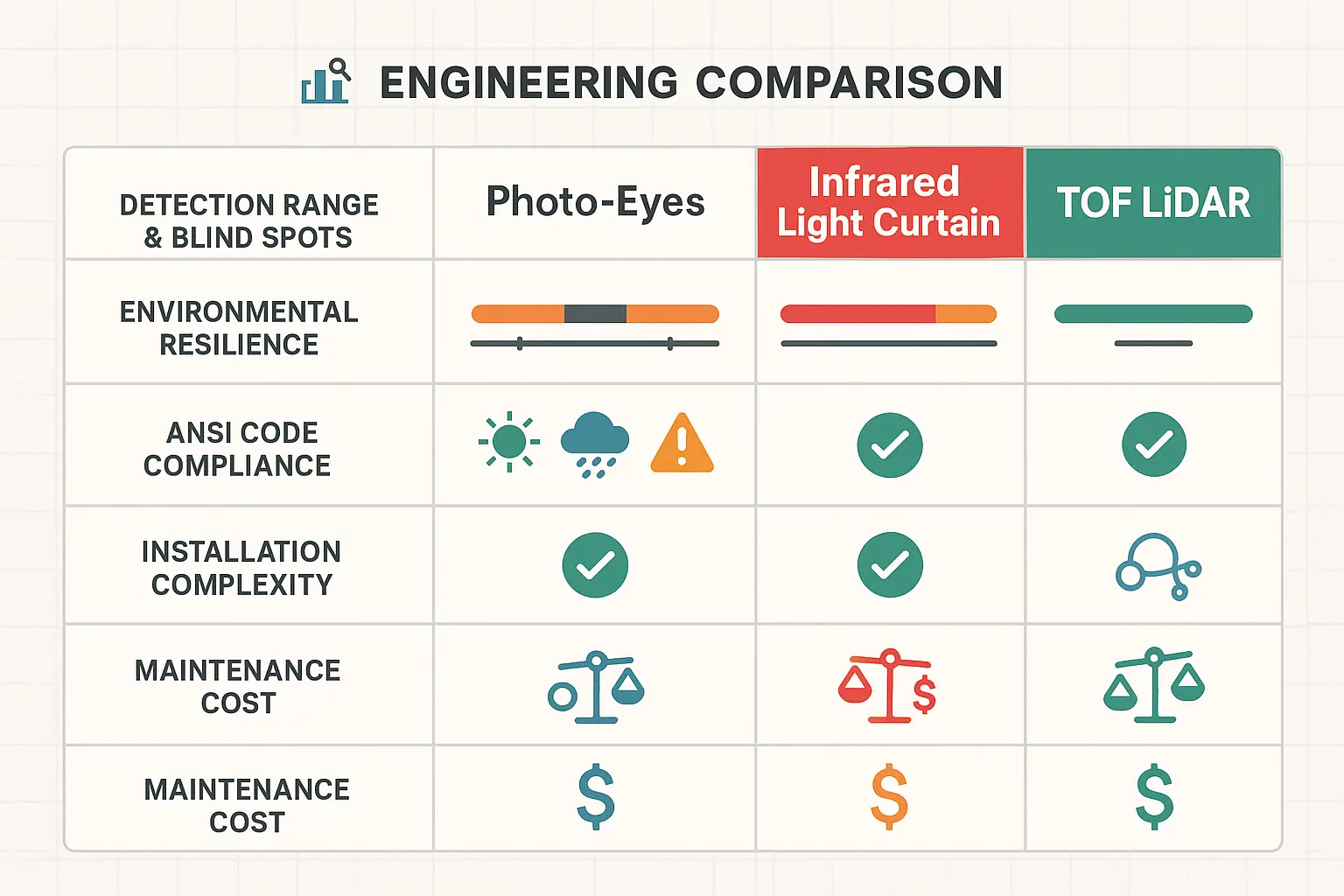
The Commercial Selector Matrix: Photo-Eyes vs. Infrared vs. LiDAR


Choosing the right technology directly impacts both building safety and operating costs. For example, bidirectional radar sensors keep automatic doors open 30% to 40% longer than necessary by detecting pedestrians walking away from or parallel to the entrance. Upgrading to unidirectional microwave radar reduces HVAC energy loss by up to 20% by initiating the closing cycle the moment a pedestrian passes through.

Commercial Selector Matrix Section comparing sensor technologies

This comparison chart anchors memory by visually contrasting the strengths and weaknesses of major automatic door sensor technologies, empowering smarter technology selection decisions.


Decoding ANSI/BHMA Safety Codes


To avoid steep liabilities and passing inspector failures, commercial operators must align with American National Standards Institute (ANSI) and Builders Hardware Manufacturers Association (BHMA) standards.

  • ANSI/BHMA A156.10 (Fully Automatic Pedestrian Doors): Applies to doors that require no manual physical action to open. This standard mandates that safety sensors or safety mats must cover the entire path of travel, with presence detection zones extending at least 5 inches from the face of the door leaf.
  • ANSI/BHMA A156.19 (Low-Energy/Power-Assist Doors): Applies to doors activated by a “knowing act” (such as push plates, wave-to-open sensors, or card readers). Because these doors operate with reduced speed and force, auxiliary safety sensors are not legally required.
  • The Monitored Safety Mandate: Under ANSI/BHMA standards, fully automatic doors must feature monitored safety circuits. Before every single closing cycle, the door’s controller performs an electrical “handshake” by briefly cutting power to the safety sensors to verify they transition to a fault state. If this handshake fails, the door immediately defaults to a safe, slow-speed manual mode. If your system encounters these errors, professional commercial automatic door repair is required to re-establish proper control board communication.

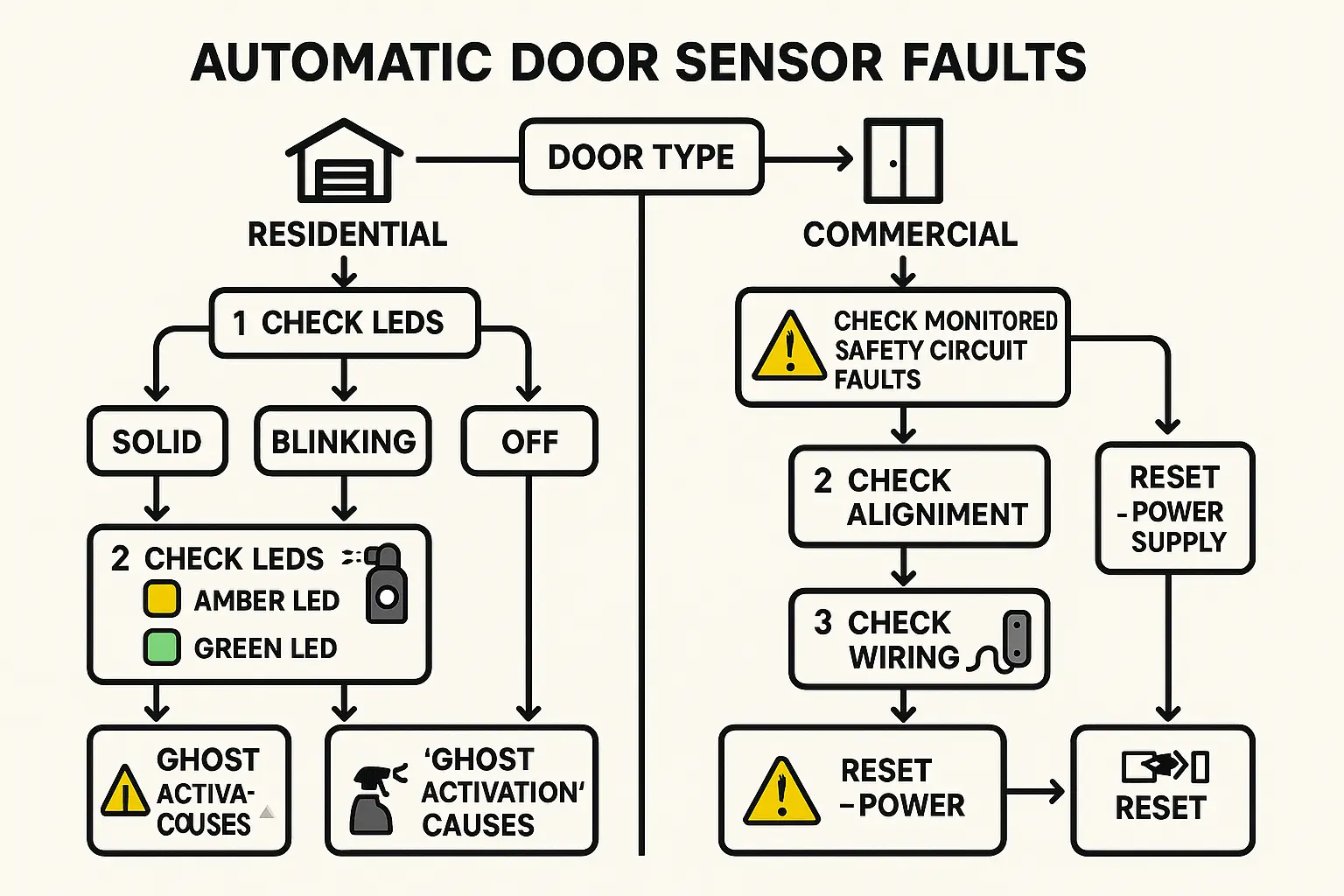
Universal Diagnostic Guide


When automatic door sensors malfunction, a structured troubleshooting approach can save hours of downtime.

Universal Diagnostic Guide Section for troubleshooting door sensor issues

This flowchart educates users on systematically diagnosing sensor issues in both residential and commercial automatic doors, empowering self-help repairs and informed technician interventions.

Residential Garage Door Troubleshooting

For standard photoelectric safety eyes, look closely at the LED diagnostic colors:

  • The Sending Eye (Amber/Yellow LED): This eye is wired directly to the power supply. A solid amber light confirms the unit has power, regardless of alignment [3].
  • The Receiving Eye (Green LED): This light only illuminates solid when it receives the infrared beam from the sender [3].
  • The Fix: If you are dealing with garage door safety sensors not working, a blinking green light points to alignment issues or physical lens blockage rather than a power failure [3]. Clean both lenses with a microfiber cloth and adjust the receiving bracket until the green LED turns solid.

Commercial Pedestrian Entrance Troubleshooting

  • Ghost Activations (Doors opening with no one there): Often caused by environmental interference like heavy rain, snow, or reflective metal finishes. Adjust the sensor’s sensitivity or switch to background analysis mode to teach the sensor to ignore static environmental changes.
  • Monitored Sensor Faults: If your commercial door remains open and shows a safety monitoring error code, check the auxiliary wiring to the control board. Ensure the monitoring output wires (typically labeled “test” or “monitor”) are securely landed on the controller’s terminals.

For complex commercial diagnostics, safety compliance mapping, or same-day repair services across Connecticut, trust the licensed technicians at A1 Doors Services to keep your entryways secure, accessible, and fully operational.


Frequently Asked Questions


What is the difference between active and passive infrared sensors?

Active infrared sensors emit their own infrared light beams and measure the reflection to detect objects, making them highly reliable for safety and presence detection in door thresholds. Passive infrared (PIR) sensors do not emit light; instead, they detect thermal energy signatures (body heat) moving across their field of view, making them ideal for security and basic activation, but less effective for stationary safety protection.

Why does my automatic door remain open when there is no physical blockage?

This is usually caused by sensor drift, lens contamination, or a failed monitored safety circuit handshake. If the control board cannot verify the health of the safety sensors during its pre-closing diagnostic test, it will hold the door open as a safety default. Cleaning the lenses and verifying sensor alignment or wiring connections typically resolves this issue.

Do low-energy handicap push-button doors require safety sensors?

According to ANSI/BHMA A156.19 standards, low-energy doors activated by a “knowing act” (like a push-plate or card reader) do not legally require safety sensors. Because these operators are programmed to run at low speeds with minimal kinetic force, the mechanical resistance of the motor is sufficient to protect pedestrians from injury.